Dev tool
Behavior Tree Editor
A visual editor, replay debugger and Unity runtime for game AI.
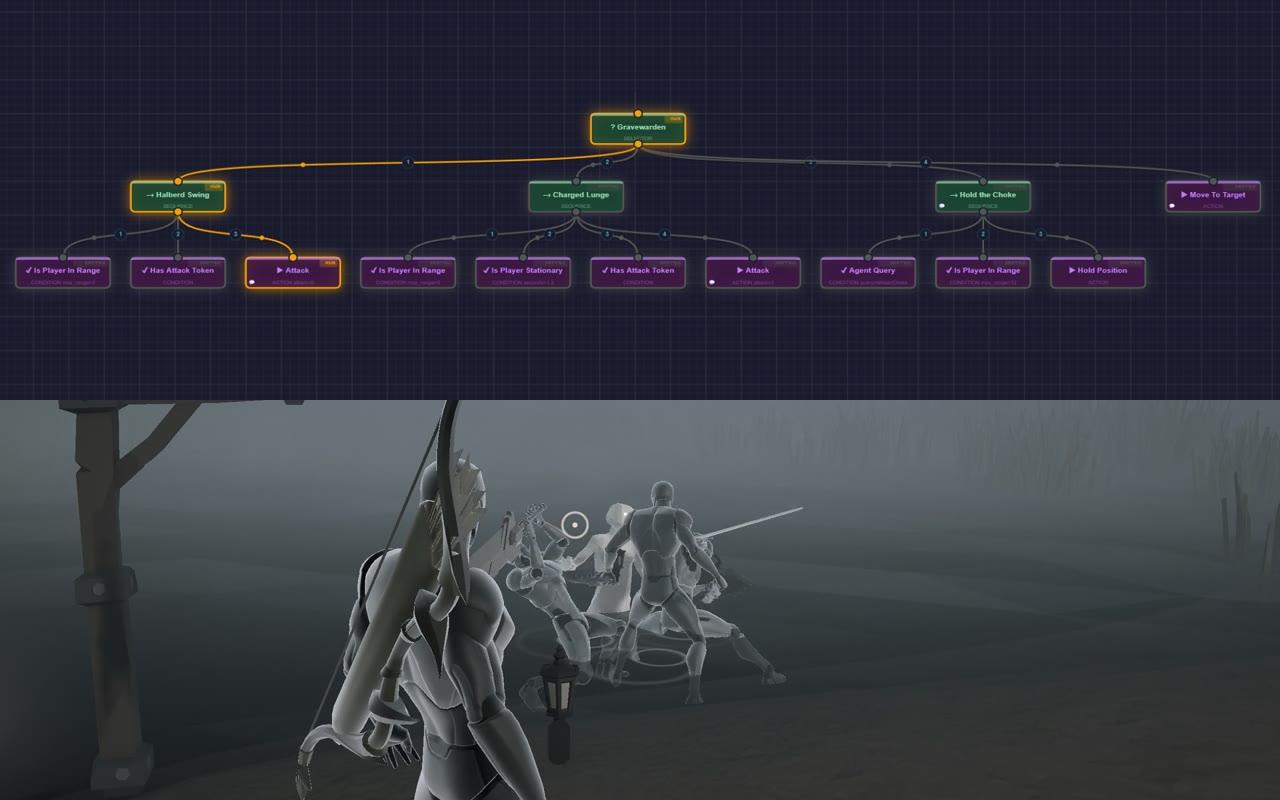


Overview
A visual node-graph editor for game AI. Design a behavior tree, save it straight into a Unity project, watch an enemy play it, then load a recording of the fight and scrub through it to see why the enemy did what it did. It ships as a small Windows app and runs unchanged in the browser.
Problem
Behavior trees are how most game enemies decide what to do, but editing them usually means opening the whole engine, and when an enemy does something odd mid-fight there's no easy way to ask why. I built this alongside Hold Steadfast, my co-op horde-defense game in Unity, so it had 14 real enemy trees to prove itself on.
Decisions
Key decisions
Canvas, not DOM or SVG. A tree is hundreds of shapes and curves, plus replay heat, particles and animation, redrawn every frame. One canvas that skips anything off screen is cheaper than keeping a DOM node per shape in sync, and clicking a node is plain geometry.
Tauri, not Electron. Tauri uses the WebView2 runtime already on Windows instead of shipping its own browser, so the installer is 2.5 MB. The Rust side only adds what a browser can't do (native dialogs, writing into the Unity project, watching files), so the same frontend still runs as a web page.
Trees are data. Logic lives in a .bt.json file and node positions in a separate layout file, so dragging a node never shows up as a logic change in a code review. Leaves bind to game code by name, and parameters on a node (like a stop distance) reach that code.
No framework. Plain ES modules with JSDoc types checked by TypeScript. The web version has no build step.
What was hard
Matching the game's own runtime exactly. Hold Steadfast's runtime has careful rules: selectors abort lower branches, sequences re-check conditions while an action runs, and attacks can't be interrupted once started. My first Unity adapter got these subtly wrong and failed silently. I rewrote it and added a test in the game that runs every tree through both runtimes and diffs every command. A deliberately changed tree fails at tick 83, which is how I know "behaves as designed" is true.
Hot reload without reading half a file. Unity only re-imports a changed file when its window gets focus, and a file can be read while it's still being written. The editor writes to a temp file and renames it; the runtime reads the file itself, once it has stopped changing. A broken file is reported and the running tree keeps going.
A replay you can trust. A recorded status only means something against the exact tree that produced it. The recorder keys every tick by node id and marks nodes that didn't run as skipped, instead of leaving last tick's status on screen.
Results
KEY NUMBERS
- Enemy trees matching the game runtime
- 13/14
By the numbers
- 13 of Hold Steadfast's 14 enemy trees open in the editor, from a 5-node mob to the 39-node Pale Warden boss (the 14th uses a node type the editor doesn't have yet)
- Each one runs through both the game's runtime and the editor's, against the same scripted world: 3 seeds × 3,000 ticks, every command compared
- 22 shared test scenarios run through both the C# runtime and the editor's JavaScript one, so the editor's simulated replay and the game agree tick for tick
- The Gravewarden, a halberd-wielding enemy, now plays a tree designed in the editor
- About 10,000 lines of JavaScript in the editor, type-checked with tsc; about 1,600 lines of C# in the Unity runtime, with 31 EditMode tests
- A 2.5 MB desktop installer. The browser version needs no build step at all.
Built with
JavaScript (ES modules, JSDoc, tsc --checkJs), Canvas 2D, Tauri v2 (Rust), Vite, a C# runtime for Unity with EditMode tests, JSON Schema, a Python validator CLI, GitHub Actions and GitHub Pages.